
Skip to content Skip to footer
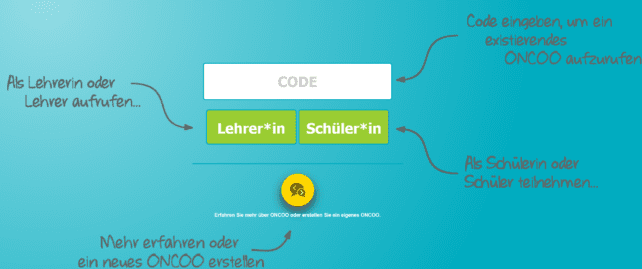
Bildschirmfoto der Startseite von Oncoo mit den Möglichkeiten:, „Code eingeben, um ein existierendes Oncoo aufzurufen“, „Als Lehrer*in oder Lehrer aufrufen“, „Als Schülerin oder Schüler teilnehmen“ oder „Mehr erfahren oder ein neues Oncoo zu erstellen“.
ONCOO
The digital toolbox ONCOO offers you different methods for collaborative and interactive learning. From brainstorming to evaluation, it allows you to actively involve your students in the course. We will show you how the tool works.
Bildschirmfoto einer ausführlich angelegten Pinnwand von TaskCards. Verschiedene Elemente wie Texte, Bilder, Videos, Kontaktkarten, Videokonferenzen und Links sind auf den Karten und nach Oberbegriffen sortiert  hinterlegt.
TaskCards
How do I provide well-structured learning materials, and how can I organize them digitally so that students can quickly find their way around? Help is provided by the online platform TaskCards, which can be used to sort and clearly display learning content, information, or deadlines.
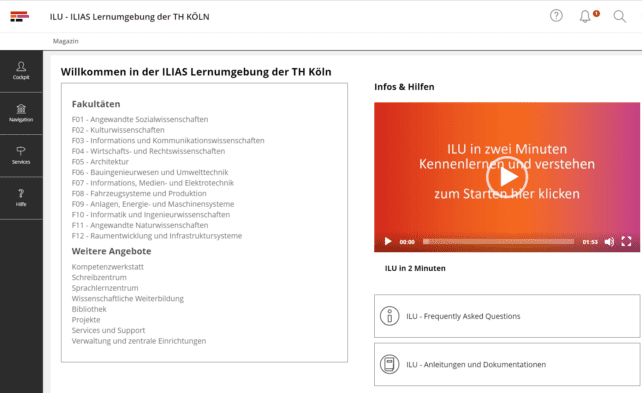
Bildschirmfoto der Startseite von ILU.
ILU – ILIAS Learning Environment
ILU stands for ILIAS learning environment and is the central learning management system of TH Cologne. ILU offers numerous functions for learning support and interactive learning, communication, and collaboration. Faculty or institution-internal digital teaching expert teams (DLE teams) advise and support the technical and didactic development of digital teaching in ILU and form the interface…
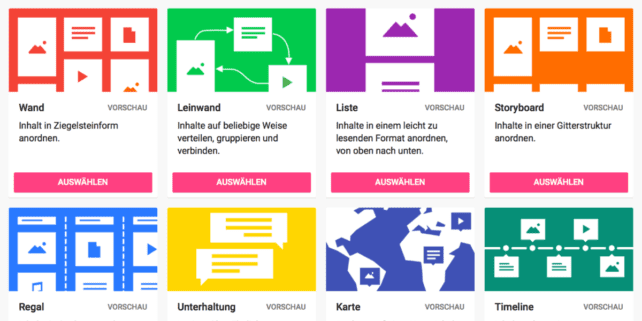
Bildschirmfoto der verschiedenen Vorlagen für ein Padlet: „Wand“, „Leindwand“, „Liste“, „Storyboard“, „Regal“, „Unterhaltung“, „Karte“, „Timeline“.
Padlet
Padlet is a collaborative web platform that allows you collect information from various sources. With Padlet, students participate actively by sharing notes, links, images, and videos—collaborative work becomes child’s play. Learn how you can use the tool to involve students more, but also how you can use Padlet for your own work organization.
Mentimeter
With Mentimenter, students can answer questions online or vote on issues – very easily and completely anonymously. Learn in this article how to use the tool to involve students interactively and in real time in your teaching.
Bildschirmfoto der Oberfläche von Camtasia. Verschiedene Videoelemente wurden zusammengeschnitten und eine Auswahl an Übergängen wird geboten.
Camtasia
Camtasia Studio offers numerous ways and options to record, edit and publish instructional videos – without additional software. We will show you the most important functions for designing your videos.
Bildschirmfoto. Ansicht von zwei Fragen, die anonym über die Anwendung gestellt wurden.
frag.jetzt
In the question rooms of frag.jetzt, students can ask questions anonymously without registering and only with a code. We explain how to set up and use the browser-based tool to break down inhibitions and answer questions for everyone.

We appreciate your feedback!

When developing this offer, we tried to include you as a teacher in advance. We would therefore be delighted if you would help us to further improve our offer. Please let us know what you would like, what bothers you or what you particularly like.

Would you like to contact us directly? Then write to us at lehrpfade@th-koeln.de!